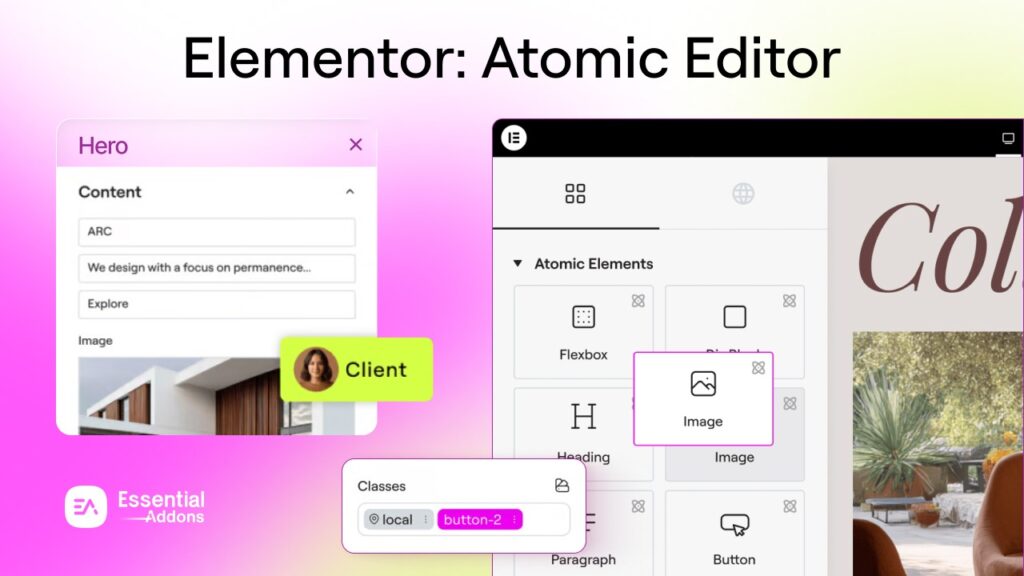
This February, Elementor Version 4 introduces a revolutionary update that changes how websites are designed in WordPress. With its new Atomic Editor and advanced design system, Elementor is redefining the future of no-code website building.
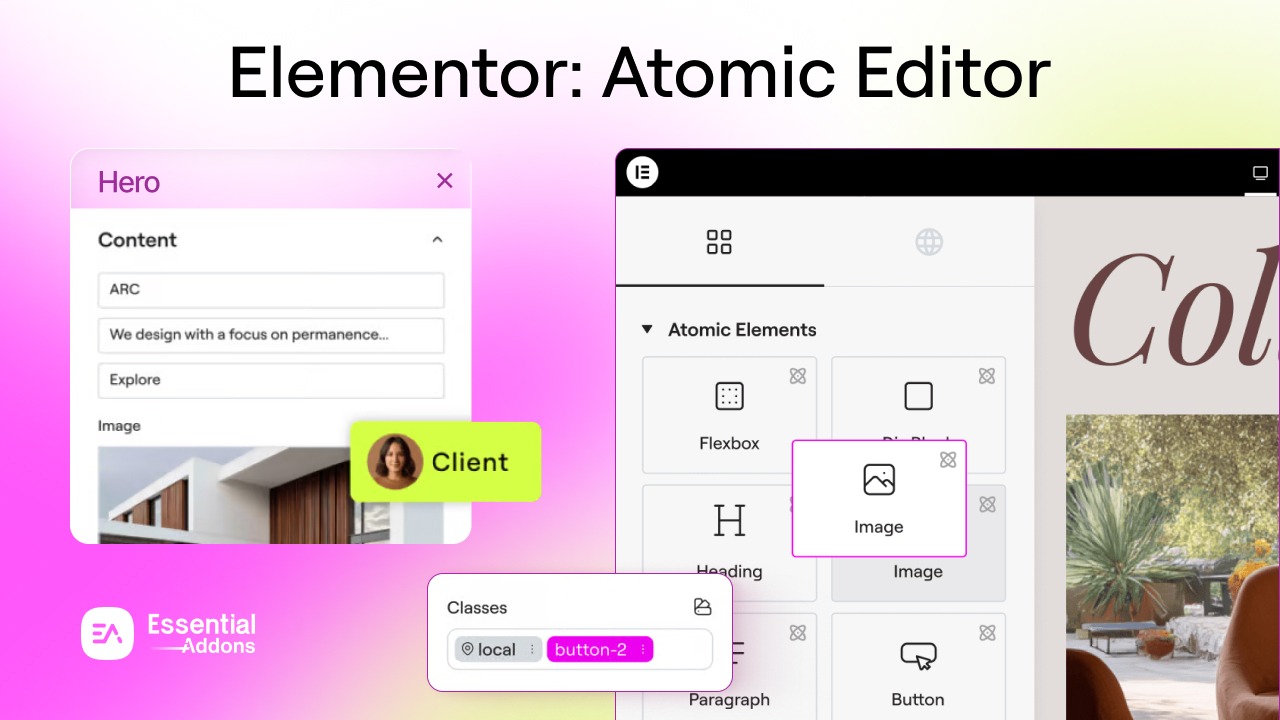
For years, Elementor has been at the forefront of no-code website creation, empowering millions of designers, developers, and agencies to build stunning WordPress websites without writing a single line of code. Now, after eight transformative years, Elementor Version 4 marks a major evolution in how you design, manage, and scale websites.
TL;DR — Elementor Version 4 Quick Summary
Too long? Here’s everything you need to know about The Atomic Editor at a glance.
| Feature | What It Does | Available For |
| Atomic Components | Create reusable layout blocks that sync across your entire site automatically | All Users |
| Inline Editing | Click directly on Atomic Heading or Paragraph elements on the canvas to edit text instantly | All Users |
| Atomic Tabs | Fully customizable tabbed layouts broken into individual, independently styleable atomic elements | All Users |
| Entrance Interactions | Add performance-friendly entrance motion effects (Fade, Slide, Scale) with granular timing controls | All Users |
| Blend Mode | Control how elements visually blend with layers behind them using 16 native CSS blend modes | Pro (Advanced+) |
| V3 + V4 Compatibility | Use V3 and V4 features side by side on the same pages — no existing content is affected | All Users |
| Current Status | Beta — available to activate now; full release expected Q1 2026 | All Users |
Elementor V3 And V4 Comparison
Now, let us have a look at some of the comparisons and what improved since then.
| Feature / Aspect | 🔵 Elementor V3 (Classic Editor) | 🟣 Elementor V4 (The Atomic Editor) |
| Architecture | Widget-based, monolithic structure | Atomic, modular component-based architecture |
| HTML Structure | Multi-div, heavier DOM output | Single-div atomic elements, leaner and faster |
| Styling Approach | Widget-by-widget styling, manually repeated | CSS-first, class-driven, cascading styles |
| Global Styles | Limited global colors and fonts via Site Settings | Full Global Variables (colors, typography, sizes) via Variables Manager |
| CSS Classes | Not natively supported | Built-in Global CSS Classes with full cascade support |
| Reusable Layouts | Global Widgets (widget-level only) | Components (layout-level, with synced instances sitewide) |
| Per-Instance Customization | Not available on Global Widgets | Component Properties — expose only specific fields for editing |
| Inline Text Editing | Not available — editing done via panel only | Click-to-edit directly on the canvas for Heading & Paragraph elements |
| Tabbed Layouts | Single monolithic Tabs widget | Atomic Tabs — fully modular, independently styleable tab elements |
| Motion & Animations | Entrance animations via a basic preset system | Atomic Entrance Interactions — granular Fade, Slide, Scale with timing controls |
| Custom CSS | Global or page-level, prone to style leakage | Element-scoped, isolated Custom CSS with state & class support (Pro) |
| Blend Modes | Not available natively | ✅ 16 native CSS Blend Mode options per element (Pro) |
| Responsive Controls | Responsive breakpoints available but inconsistent | Responsive-by-default for all style options across Desktop, Tablet, Mobile |
| Design Token System | No token-based system | Full token-based design via Variables Manager |
| State Styling | Basic hover states on some widgets | Hover, Focus, Active, and Selected states across all atomic elements |
| Team Collaboration | Limited — no structure/content separation | ✅ Clear separation of structure, styling & content for safer team workflows |
What Is Elementor Version 4 And the Atomic Editor?
Elementor Version 4 is built around the concept of atomic design. This methodology breaks complex user interfaces into the smallest and most fundamental building blocks, called atoms. These atoms are then combined to create larger structures.
The Elementor Atomic Editor introduces a new architectural foundation that clearly separates three key dimensions of web design: structure, styling and content. In the previous version, these were often intertwined, making it difficult to reuse styles globally, maintain design consistency, or scale websites predictably.
With the Elementor Atomic approach:
- Every element is a modular atomic component: Headings, buttons, images and more, each built with a lean, single-div HTML structure for faster rendering and better performance.
- Styling is CSS-first, meaning styles are defined through Global Classes and Variables that cascade predictably across your entire website.
- Content is editable independently from structure and styling, enabling safer team collaboration and client handoff.
The result is a more predictable, scalable and professional editing experience, one that brings Elementor in line with how modern design systems and development workflows operate.
Key Features of Elementor Version 4 Atomic Editor
The Elementor Atomic Editor arrives packed with powerful new capabilities. Here is a deep dive into the most significant changes and features that define the Atomic Editor experience.
1. Atomic Components
One of the most powerful introductions in Elementor Version 4 is Components, a core building block that enables true layout-level reuse across your entire website.
Think of Components as supercharged templates, but smarter. You can turn any container into a component, give it a clear identity and then reuse it in multiple places. The key difference? When you edit a component, every instance on your site updates automatically, including structure and styling. This allows teams to maintain a consistent design system across large websites.
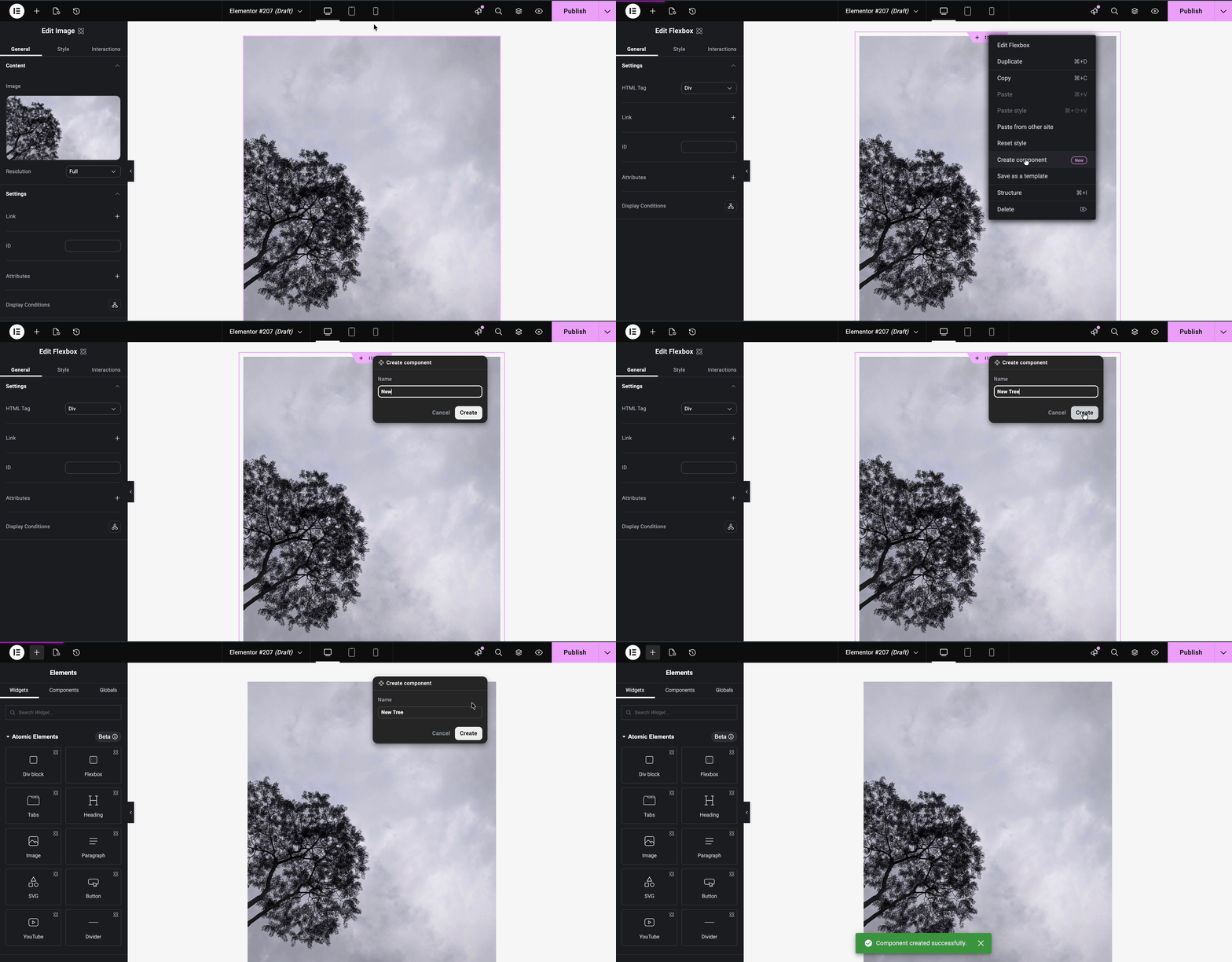
This is particularly transformative for:
- Shared banners and CTAs that appear across multiple pages
- Feature grids and pricing cards that need global consistency
- Headers, footers, and repeated layout patterns
Components appear in a dedicated Components tab alongside the Elements tab, making them easy to access and deploy, just like any native Elementor element.
Control What Editors Can Change
Components also support Component Properties — a system that lets admins expose only specific content fields (text, media, links, HTML tags) for per-instance editing, while locking the layout and styling globally. This makes Components exceptionally powerful for agency workflows, client handoffs, and multi-user team collaboration.
2. Inline Editing
Say goodbye to the back-and-forth between the panel and the canvas. Elementor Version 4 introduces Inline Editing for Atomic Heading and Paragraph elements, allowing you to click directly on text on the canvas and start editing immediately. Changes are applied instantly and stay synchronized with the panel. A floating formatting toolbar appears contextually near the selected text, giving you quick access to formatting options without disrupting your workflow. It supports keyboard shortcuts, stays within viewport boundaries, and applies all formatting visually, no HTML required.
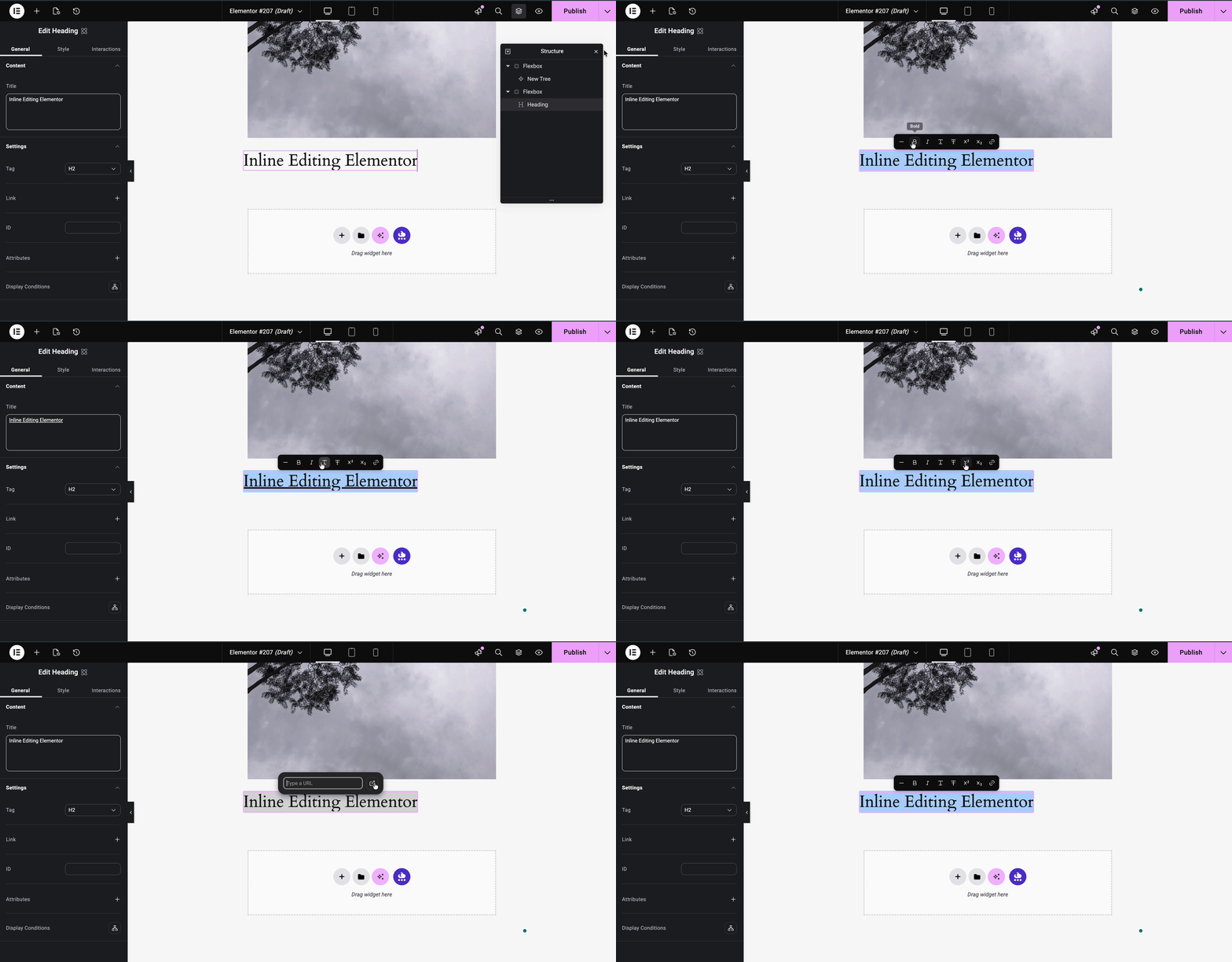
This makes quick copy changes, layout reviews, and content iterations significantly faster and more intuitive — especially when working across multiple sections or pages.
3. Atomic Tabs
The Atomic Tabs widget is a major addition to the Elementor Atomic Editor that gives you unprecedented control over tabbed content layouts. Rather than relying on a single monolithic widget, Atomic Tabs breaks the interface into separate atomic elements that you can style and configure individually.
The structure includes:
- Tabs main wrapper
- Tabs menu — the row containing tab triggers
- Tab trigger — each clickable tab
- Tabs content area — the container for all content panels
- Tab content panel — the content of each tab
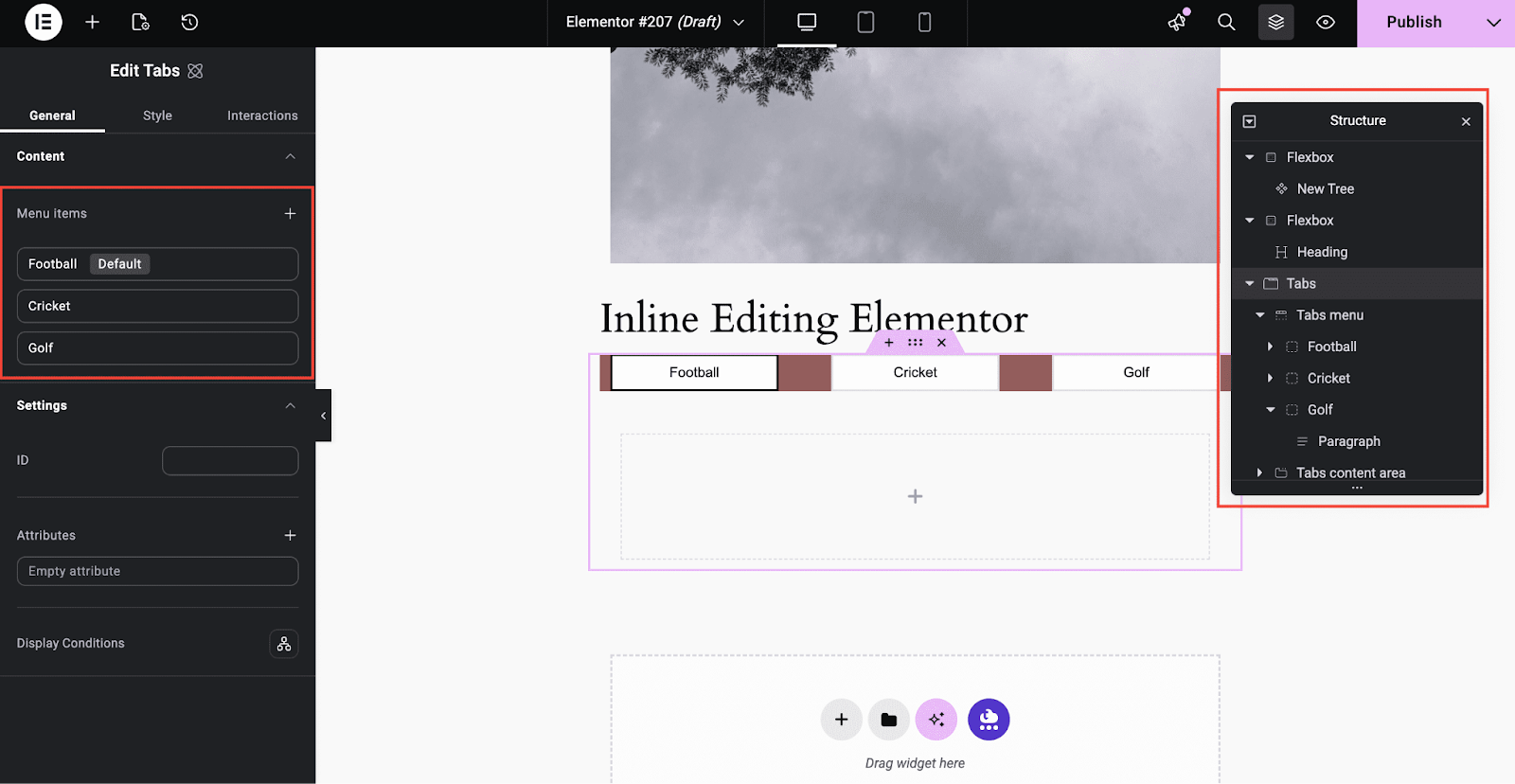
You can nest any type of content inside tab triggers or content panels, text, images, icons and widgets, unlocking tab designs that were simply not possible before.
A dedicated Selected state is also available for tab triggers, letting you style active tabs cleanly without custom code. Atomic Tabs fully supports Global Classes, cascading styles, and structural guardrails, making it a seamlessly integrated part of the atomic styling system.
4. Entrance Interactions
Entrance Interactions mark the first phase of Elementor’s atomic interactions system, providing a simple yet elegant way to add motion effects to your elements without compromising performance.
A new Interactions tab now appears alongside General and Style in the editor panel, giving interactions a dedicated, structured space.
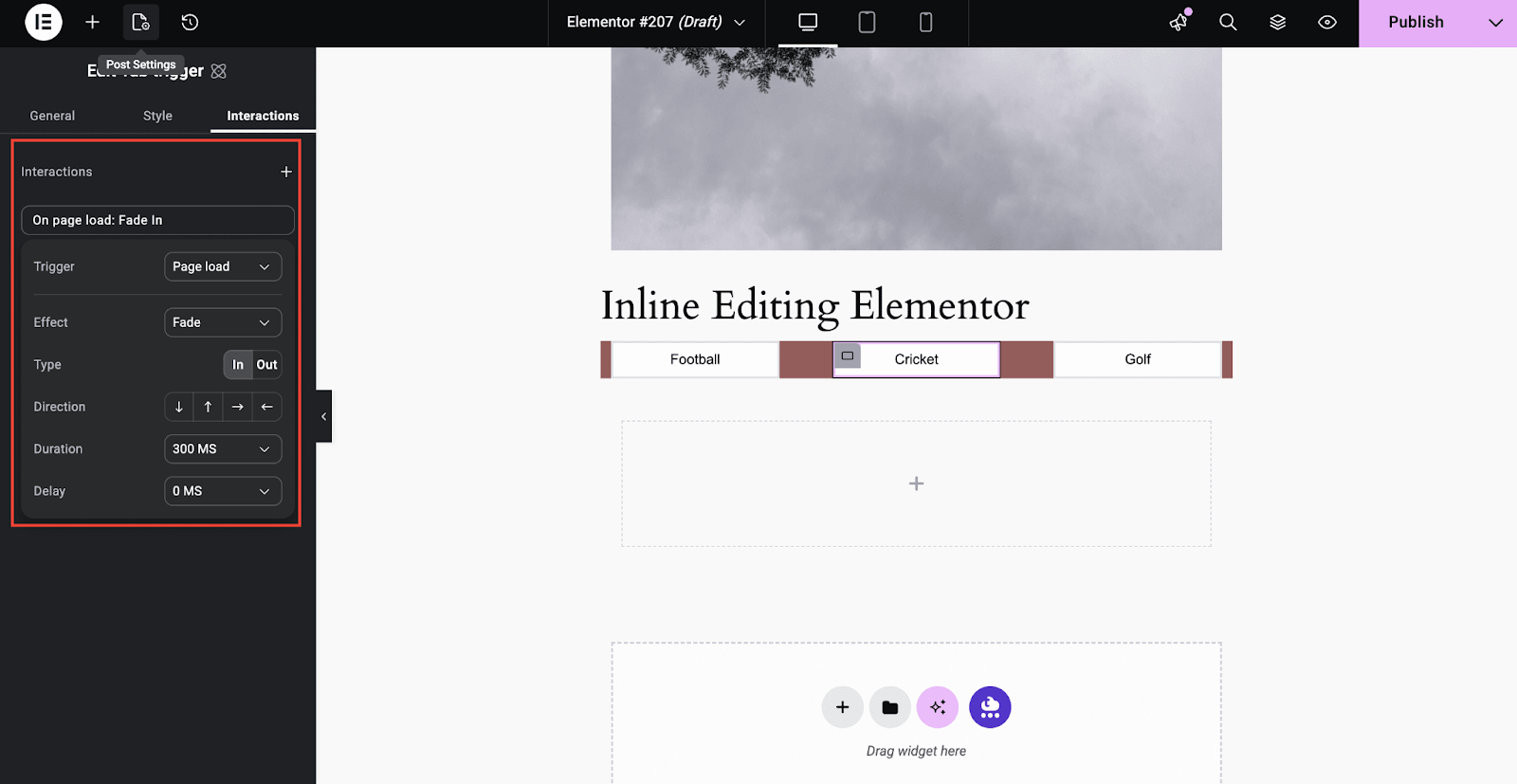
Available controls include:
- Triggers: On Page Load, On Scroll Into View
- Effects: Fade, Slide, Scale
- Type: In or Out
- Directions: Up, Down, Left, Right
- Duration: 0.1s to 3s
- Delay: 0 to 2s
You can stack multiple entrance effects on a single element — combining Fade, Slide, and Scale for richer, more expressive motion. A built-in Preview button lets you replay the animation instantly as you fine-tune timing and behavior. This is just the foundational stage; future releases will continue expanding Elementor’s interaction capabilities.
5. Blend Mode
The Blend Mode control is a new addition that defines how an element visually interacts with the layers behind it. Using native CSS blend modes, Multiply, Screen, Overlay, Darken, Lighten, and more (16 modes total), you can create subtle overlays, striking contrast effects, or intricate layered compositions directly within the Editor.
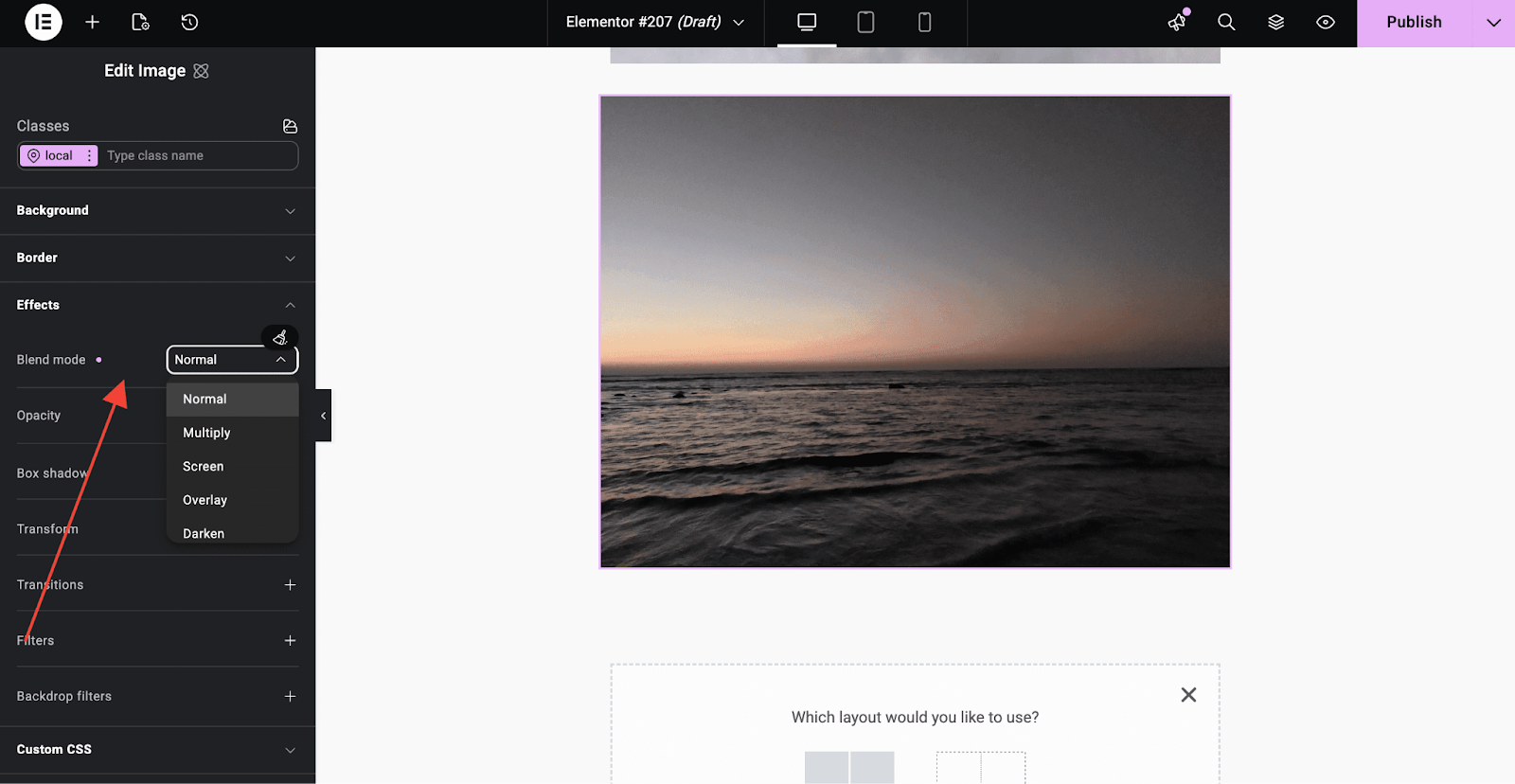
Whether you’re enhancing background images, crafting standout text effects, or unifying a site’s color palette, Blend Modes add a level of visual finesse that was previously only possible through custom code or external image editors.
6. Custom CSS
The Custom CSS control has been completely reengineered for the Elementor Atomic Editor, giving advanced users a powerful, clean, and isolated way to write CSS directly within the editor.
Key highlights:
- Element-level isolation — CSS applies only to the selected element, eliminating unintended overrides
- Classes support — Add Custom CSS to Global Classes and apply it across multiple elements
- State-specific styling — Write CSS for hover, focus, and active states directly in the Style panel
- Developer-friendly editor — Features autocomplete, comments, and an expandable input field
- Full responsive control — Define different CSS rules for Desktop, Tablet, and Mobile
- Real-time preview — See updates reflected instantly in the canvas
Custom CSS can also be combined with the new Background Clipping feature to create stunning, lightweight motion effects like gradient text animations — all without external tools or heavy scripts.
How to Upgrade to Elementor Version 4
Activating the latest Elementor version and its atomic features is a straightforward process. Here’s exactly how to do it:
Step 1: Update Elementor to the Latest Version
Go to your WordPress Dashboard → Plugins → Installed Plugins, find Elementor, and click Update. Make sure you are running Elementor 3.35 or later.
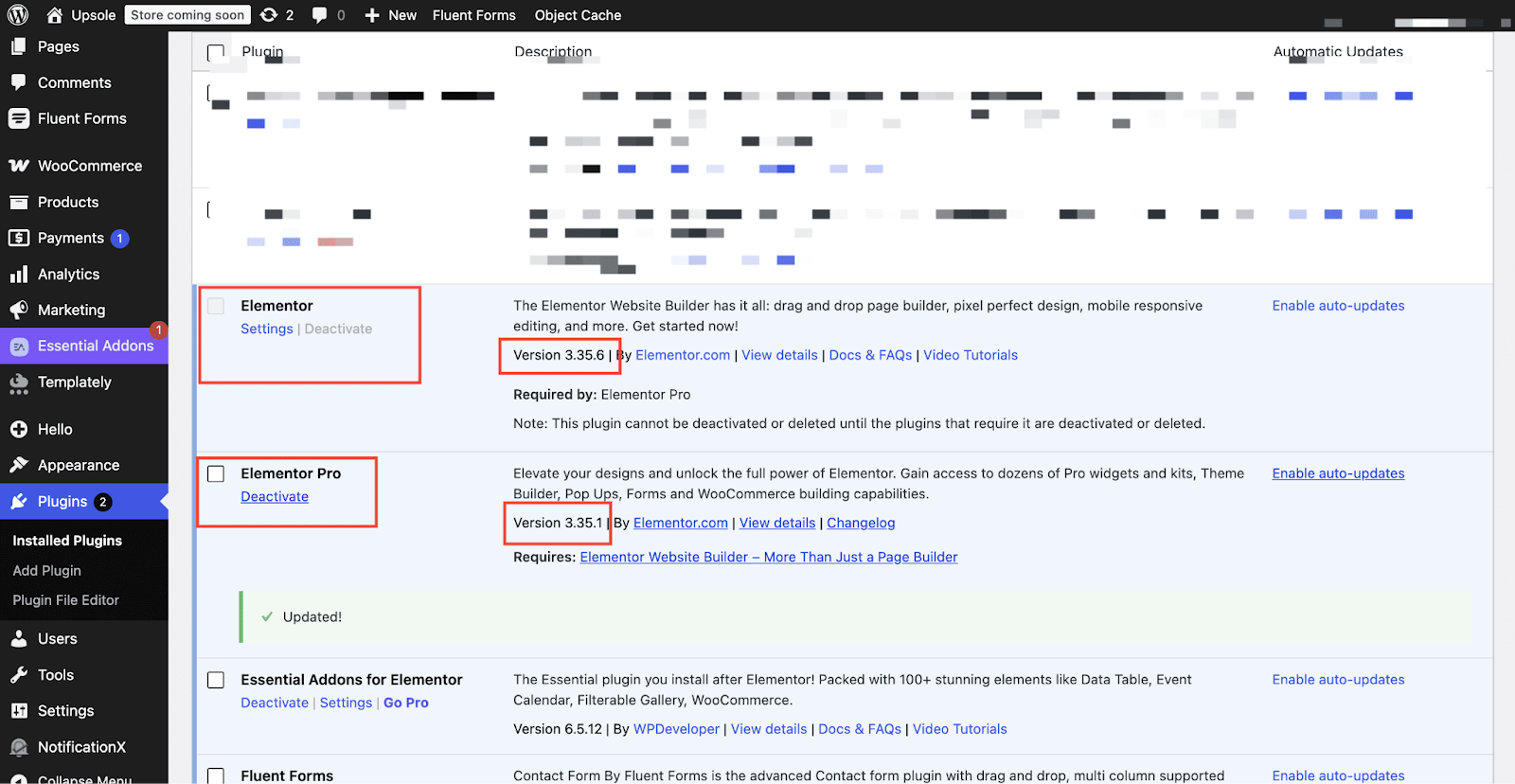
Step 2: Navigate to Editor V4 Settings
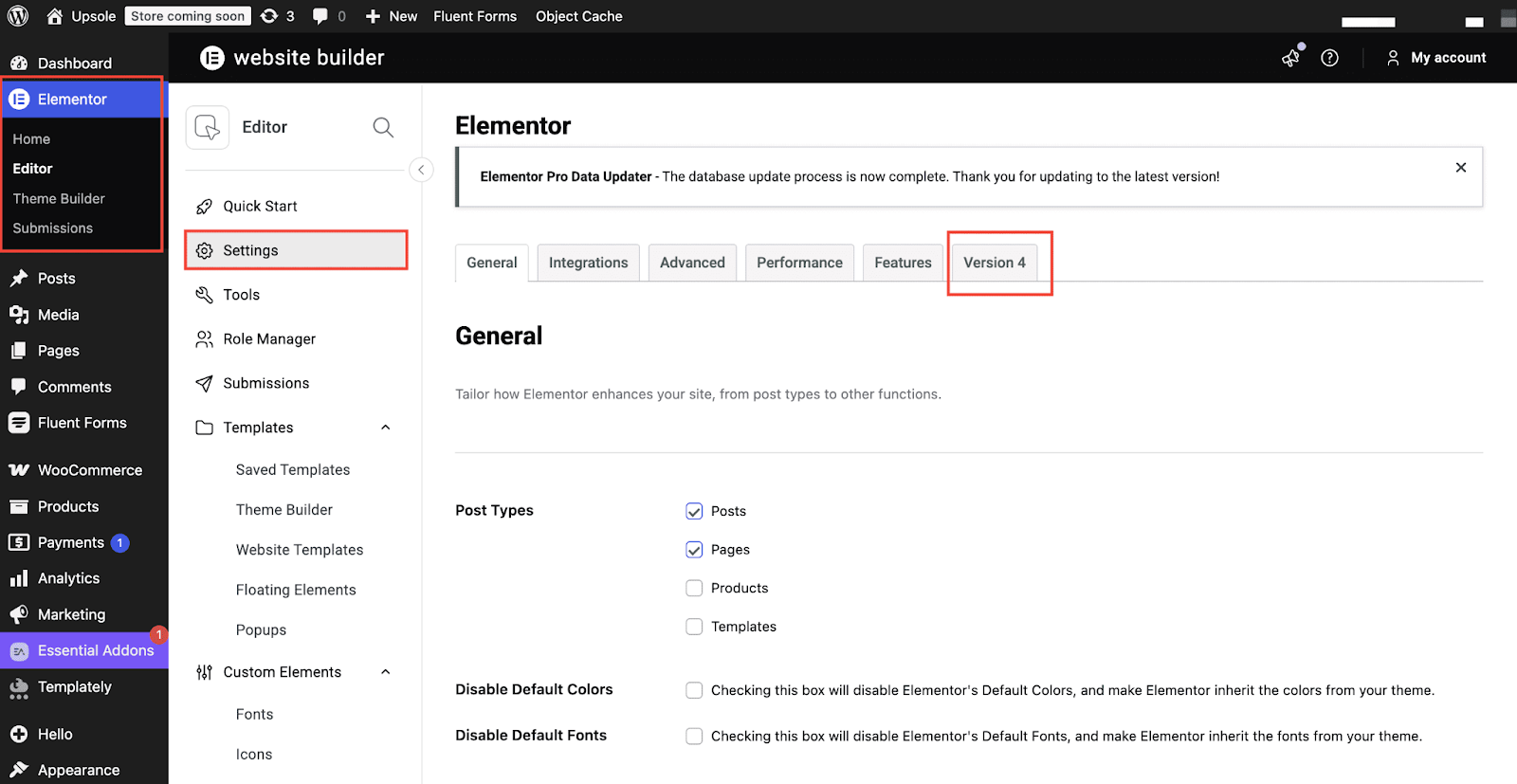
In your WordPress Dashboard, go to Elementor → Settings → Editor V4 tab (or Version 4, depending on your version).
Step 3: Click Activate
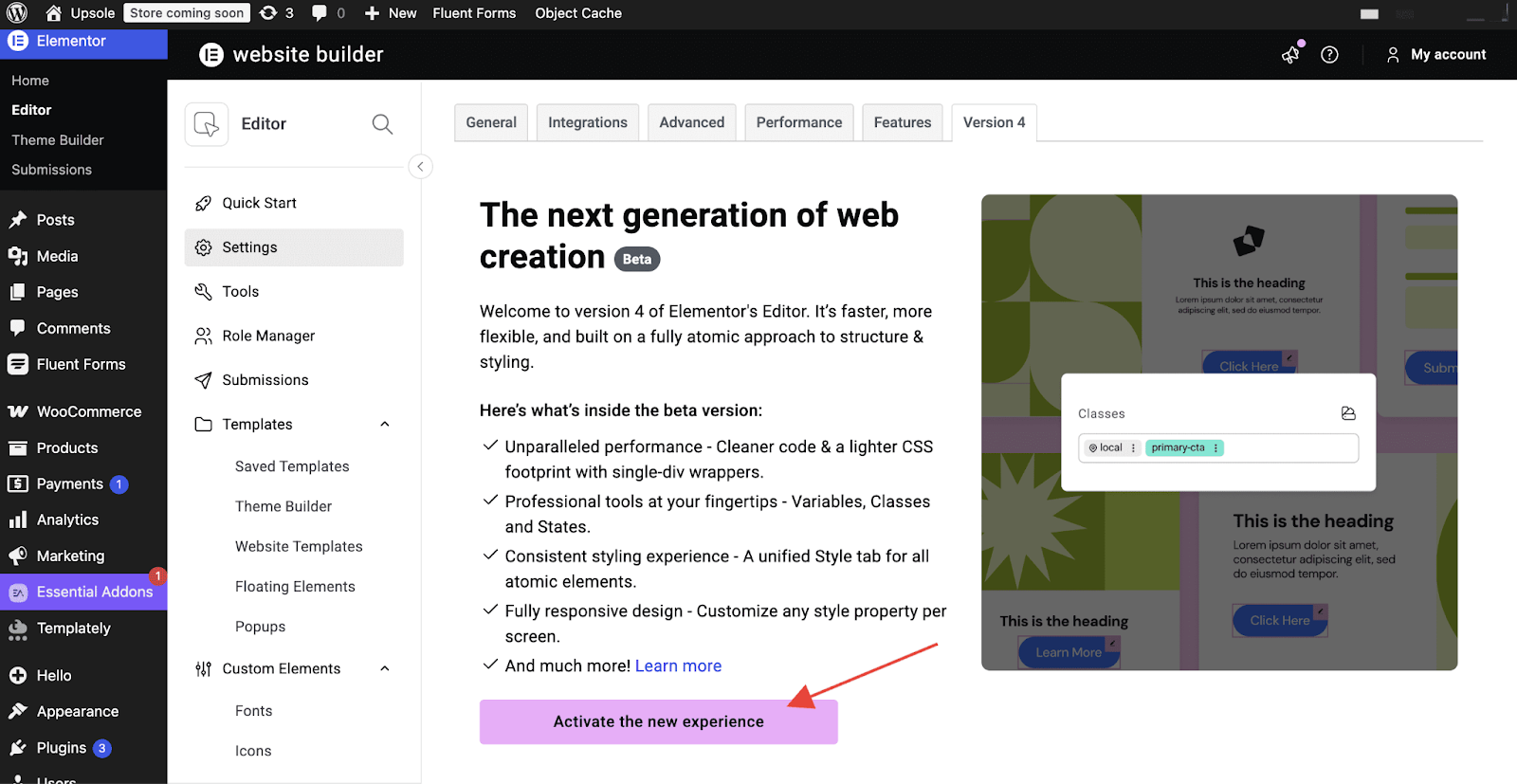
Click the Activate button. That’s it! The Elementor Atomic Editor features will now be available in your editor alongside your existing V3 elements.
Embracing the Future of Web Design with the Atomic Editor
Elementor Version 4: The Atomic Editor is far more than a feature update — it is a foundational shift in how websites are built, managed, and scaled with Elementor. By separating structure, styling, and content through an atomic, CSS-first approach, the Elementor Atomic Editor brings professional-grade design system capabilities to every Elementor user — free, Pro, or One.
From reusable Components that sync across your entire site, to Global Classes and Variables that eliminate repetitive styling, to Entrance Interactions that add polished motion without performance cost, every feature in The Atomic Editor is designed with scalability, consistency, and real-world workflows in mind.
As the latest Elementor version moves toward its full release, now is the perfect time to explore its capabilities, test it on your staging environment, and prepare your workflows for the future. The foundation is set — and it’s atomic.
Was this blog helpful? Don’t forget to subscribe to the blog and join our Facebook community.
Common FAQ About Elementor V4: The Atomic Editor
What exactly is Elementor Version 4: The Atomic Editor?
Elementor Version 4, also called The Atomic Editor, is a complete architectural overhaul of the Elementor page builder. It introduces a CSS-first, class-driven design system built around atomic principles — meaning every element is a modular, reusable building block with a clear separation between structure, styling, and content. It is designed to make web design more scalable, predictable, and team-friendly compared to the previous V3 experience.
Will upgrading to Elementor Version 4 break my existing website?
No. Elementor V4 and V3 are fully compatible and designed to coexist. All your existing V3 pages, widgets, content, and features remain completely intact after activation. You can use V4 and V3 elements together on the same pages and sites without any conflict. The upgrade is additive — it adds new capabilities without removing anything you already have.
Is The Atomic Editor available for free Elementor users or only for Pro?
Most of the core Elementor Atomic Editor features — including Atomic Components, CSS Classes, Variables, Inline Editing, Atomic Tabs, and Entrance Interactions — are available to all Elementor users, including Free, Pro, and One plan subscribers. Some advanced features, such as Custom CSS (V4) and Blend Mode, are exclusive to Elementor Pro users on the Advanced plan or higher.
Is Elementor Version 4 ready for production/live websites?
As of now, Elementor V4 is in Beta. Elementor officially recommends testing it on staging or development environments before deploying it on live production sites. A production-ready Beta rollout is scheduled for Q1 2026, followed by the full official release shortly after. That said, many experienced users are already experimenting with it on live sites with great results.
How is the new Components feature different from Elementor’s existing Global Widgets?
While Global Widgets in V3 allowed you to reuse a widget across pages, Components in The Atomic Editor operate at the layout level — meaning you can make entire containers or sections reusable. More importantly, Components support Component Properties, which allow admins to expose only specific content fields (like text, images, or links) for per-instance editing, while the layout and styling remain globally locked and protected. This makes Components far more powerful for team workflows, agency projects, and client handoffs.
Can I use Essential Addons for Elementor alongside Elementor V4?
Absolutely! Essential Addons for Elementor is fully compatible with Elementor and continues to work seamlessly alongside both V3 and V4 features. As the Elementor Atomic Editor matures toward its full release, Essential Addons will continue to evolve in step — ensuring all 110+ widgets and templates remain available and optimized for the best possible experience, regardless of which Elementor version you are running.
What happens to my site after Elementor V4 becomes the default?
When Elementor Version 4 officially launches and becomes the default experience, it will only apply automatically to new sites. Existing sites will not be automatically migrated. You will still have full control over when and how you adopt V4 features, and your current V3-built pages will continue to function exactly as they always have.