
If you have built your website on Elementor, you already know how to make it look right. The layouts are clean, the sections flow well, and every page feels intentional. But looking right and ranking right are two different problems and lately, a third problem has joined the mix: getting cited, not just ranked, when people ask AI tools like ChatGPT, Gemini, or Google’s AI Overviews a question your content could answer. That is why thinking more about Elementor SEO is important.

This is the gap a lot of Elementor users do not realize they have. Elementor is a design tool first. It was never meant to handle meta tags, schema markup, sitemap structure, or the kind of machine-readable formatting that AI crawlers now look for. That job has always belonged to a dedicated SEO layer, and increasingly that layer needs to speak both “Google” and “AI” fluently.
That is where ThinkRank comes in. ThinkRank is an AI SEO plugin built by WPDeveloper, the same team behind Essential Addons and it’s compatibility-tested against Elementor and Essential Addons widgets, so the structured data and schema it generates line up with what you’ve actually built on the page.
It’s built for the way WordPress SEO is actually evolving, and it works natively inside Elementor’s builder, no switching tabs, no exporting content into a separate SEO tool, no guessing whether your page structure will survive an AI crawl. Some describe it as the SEO plugin your AI assistant can actually use, built around the idea that you should show up in every AI answer, not just on Google. In this post, we’ll break down exactly where Elementor sites tend to fall short on SEO and AI visibility, and how ThinkRank fixes it, with practical examples along the way.
Quick Summary
Too long? Didn’t read? Here is a quick summary of the post.
| What | Details |
| Problem | Elementor sites often have weak metadata, missing schema, and no AI-readable content structure |
| Why it matters now | Google AI Overviews, ChatGPT, and Perplexity increasingly answer queries directly, bypassing traditional search clicks |
| The fix | ThinkRank, an AI SEO plugin with native Elementor widgets, AI-generated metadata, one-click schema, llms.txt generation, and a built-in MCP server |
| Who it’s for | Elementor users, agencies, and content teams who want SEO and AI-search readiness without leaving their builder, WooCommerce store builders |
| Setup time | In under a few minutes to install, connect Search Console, and run your first content check-up |
| Cost to try | Free plan available; PRO unlocks rank tracking, AI internal links, and advanced schema |
Why Elementor Sites Struggle With SEO (And Now, AI Visibility Too)
Elementor is fantastic at what it’s designed for: visual page building. But that flexibility comes with a quiet SEO cost. Page builders generate a lot of nested HTML and unless you are deliberate about heading structure, alt text and internal linking, it is easy to end up with a beautiful page that search engines and AI crawlers struggle to parse cleanly.
A few patterns show up again and again on Elementor sites:
- Inconsistent heading hierarchy. Designers often pick heading tags based on how the text looks rather than its actual place in the content structure, so an H3 might appear before an H2 further up the page.
- Missing or duplicate meta titles and descriptions. Elementor does not handle these at all on its own; that is always an SEO plugin’s job.
- No structured data (schema). Product pages, FAQs, and reviews built visually in Elementor rarely get the schema markup that helps search engines and AI tools understand them.
- Bloated but SEO-blind pages. A landing page can load fast and look sharp, and still tell search engines almost nothing useful about what it’s actually about.
These oversights tend to compound quietly over time, which is exactly what makes them worth checking. This breakdown of Elementor SEO mistakes that are quietly killing your rankings is a useful reference if you want to see the full list.

Now add the AI layer on top. Even Elementor sites that have decent traditional SEO are often invisible to AI answer engines, simply because nothing on the page is formatted in a way an AI crawler can efficiently extract and summarize.
That gap used to be a clear differentiator, but it’s closing fast. Other SEO plugins have both started shipping their own llms.txt and AI-assist features, so a plain llms.txt file alone is not enough. What’s harder to copy is the layer underneath it: schema and metadata generated at the widget level so it actually matches your Elementor structure, and an agentic MCP server that lets an AI assistant act on your site directly rather than just suggest changes for you to apply. This is exactly where ThinkRank steps in.
What Changed: Why “Getting Cited by AI” Is Now Part of SEO
For most of the last two decades, ranking well meant showing up in the ten blue links. That is no longer the whole picture. Google’s AI Overviews now answer a large share of queries directly on the results page. ChatGPT, Perplexity and Claude are increasingly used as a first stop for research, product comparisons and how-to questions, often skipping the search engine altogether.
This changes what “ranking” actually means. If an AI system answers a question using a summary of your competitor’s content instead of yours, it does not matter that your page ranks #3 on Google. You have lost the visibility that matters, even if your traditional SEO metrics look fine.
Here is a simple example. Imagine two Elementor-built landing pages for a WordPress hosting company, both covering “best WordPress hosting for small business sites.” Page A is a well-designed page with strong visuals, a comparison table and a FAQ section, but everything is plain HTML with no schema, no clear content hierarchy for the FAQ, and no llms.txt file guiding AI crawlers to it. Page B covers similar ground, but its FAQ section is marked up with FAQ schema, its content has a clean, single-H2-per-topic structure, and the site has an llms.txt file pointing AI crawlers directly to its most authoritative pages.
When someone asks an AI assistant “what’s the best WordPress hosting for a small business,” Page B has a real structural advantage: the AI system can parse its FAQ answers cleanly, understand what the page is actually about without guessing and attribute the answer back to it with confidence. Page A might have equally good information, but it’s harder for the AI to extract and trust it in the same way.
This is exactly the kind of gap ThinkRank was built to close and it does it while working directly inside the tools Elementor users already use.
Introducing ThinkRank: AI SEO That Works Inside Elementor, Not Around It
This is what happens in the most SEO plugins: you build your page, then jump into a separate tab or metabox to handle SEO fields. ThinkRank takes a different approach. It ships native Elementor widgets alongside its Gutenberg and Classic Editor support, so the same content patterns and structured data it generates elsewhere are available directly inside your Elementor workflow, without you needing to leave the builder.

Here’s what that actually covers.
AI Features That Set ThinkRank Apart
These are the capabilities you won’t find in a traditional Elementor SEO setup — they’re what turn ThinkRank from a metabox-filler into something closer to an AI SEO assistant.
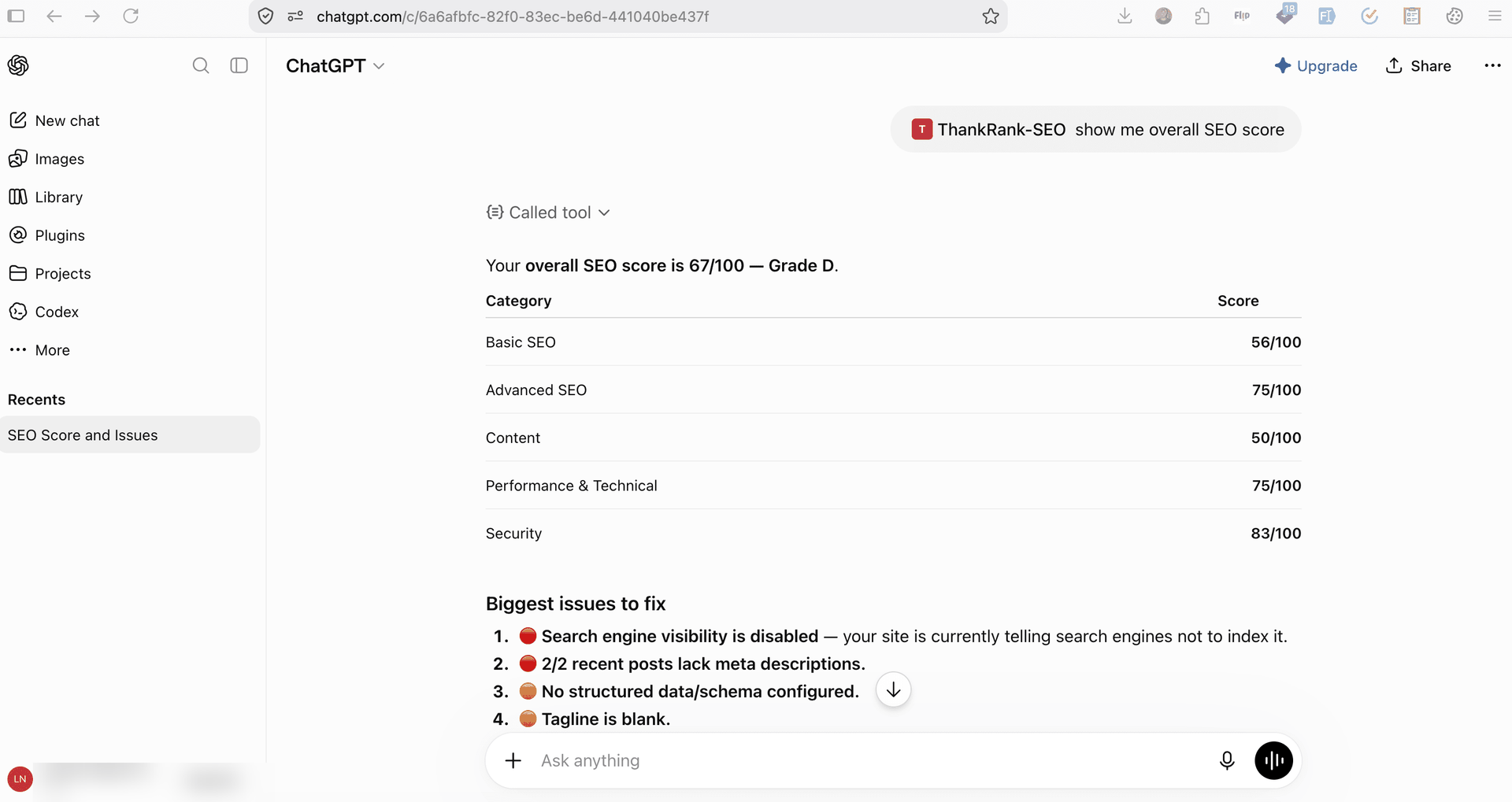
A Built-In MCP Server: Ask an AI Assistant to Manage Your SEO
ThinkRank includes a self-contained MCP (Model Context Protocol) server, which lets AI assistants like Claude, ChatGPT, or Cursor connect directly to your WordPress site and help manage SEO in plain language, things like “write a meta description for this page” or “check which of my Elementor landing pages are missing schema.” No separate plugin, no terminal setup. It effectively turns your AI assistant into an SEO operator that can act on your site, not just chat about it.
llms.txt Generation: Speaking AI’s Language
ThinkRank generates and manages your site’s llms.txt file, a structured, AI-readable index of your most important content, similar in spirit to a sitemap, but built for language models rather than search crawlers. If you run a documentation-heavy or content-heavy Elementor site, this is one of the more direct ways to help AI systems find and correctly summarize your most authoritative pages, rather than guessing from raw HTML.
Note: llms.txt is read mostly by AI coding assistants and agent tools today. Google has said it doesn’t use it for Search, so treat it as a low-effort way to future-proof your site.
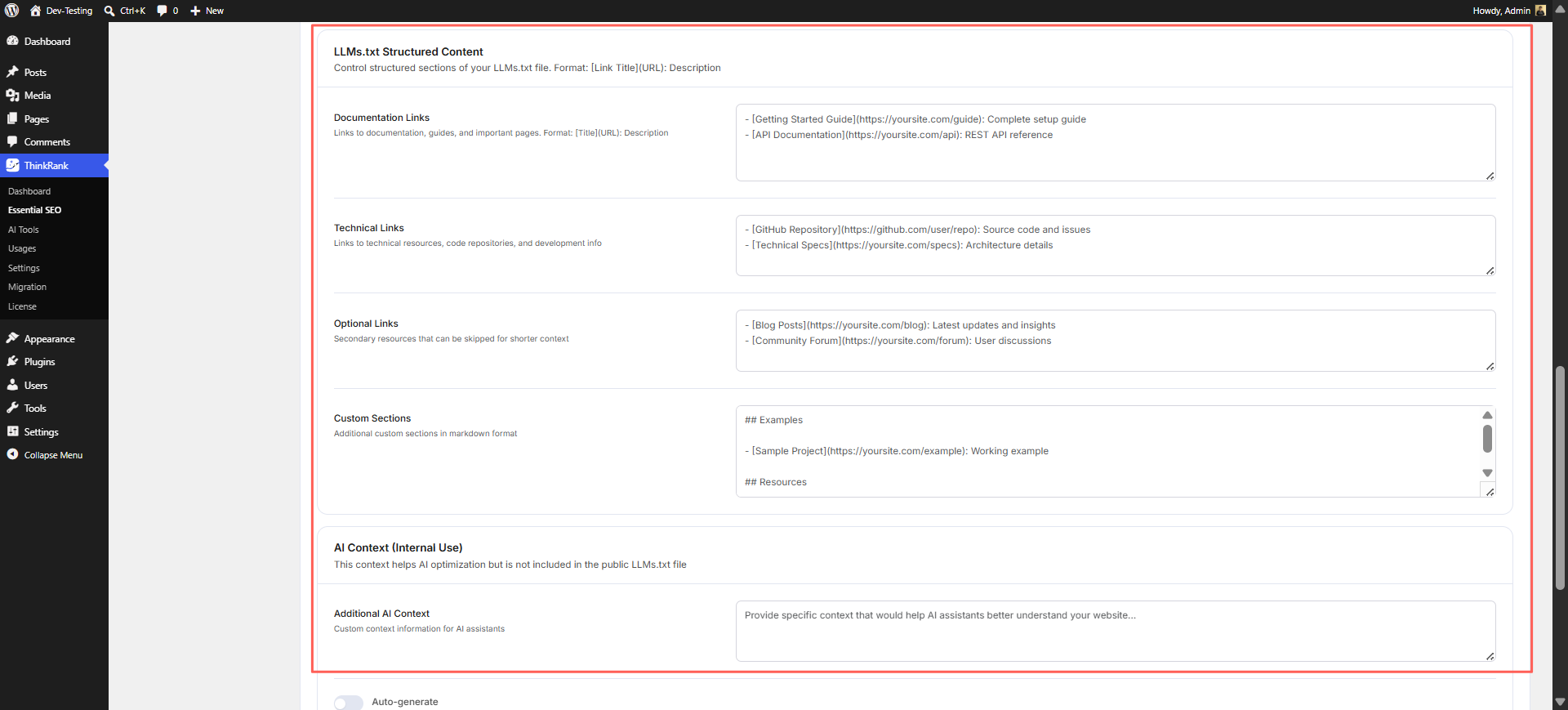
If you maintain a knowledge base alongside your Elementor site, this pairs well with fundamentals covered in our WordPress knowledge base SEO checklist, worth checking alongside your llms.txt setup so both traditional crawlers and AI crawlers are working from clean, well-structured content.
AI-Generated Meta Titles And Descriptions
Writing unique, keyword-relevant meta titles and descriptions for every Elementor page and post is one of those tasks that’s easy to postpone indefinitely. ThinkRank generates them for you based on your actual page content, once you’ve connected an AI provider during ThinkRank’s first-time setup. For example, instead of a default title like “Home – My Website,” it can suggest something closer to “Affordable WordPress Hosting for Small Business Sites | [Brand]”, directly informed by what’s actually on the page.
Real-Time Content And Keyword Analysis
As you build a page in Elementor, ThinkRank’s live analysis flags common issues: thin content, missing keyword usage in headings, low readability, or an absent meta description. It’s the same kind of feedback loop you would expect from a content editor, but scoped specifically to search and AI-readiness rather than just grammar.
The SEO Fundamentals ThinkRank Delivers
AI features get the spotlight, but ThinkRank hasn’t skipped the groundwork every Elementor site still needs.
Real-Time SEO Score: A 13-Factor Read on Every Post
As you build in Elementor, ThinkRank runs a live SEO score against 13 separate factors, things like keyword placement, heading structure, meta completeness and readability, and tells you exactly which ones are dragging the score down. It’s a more granular signal than a simple pass/fail check and it means you are not left guessing which part of the page still needs work.
Schema Markup without Touching Code
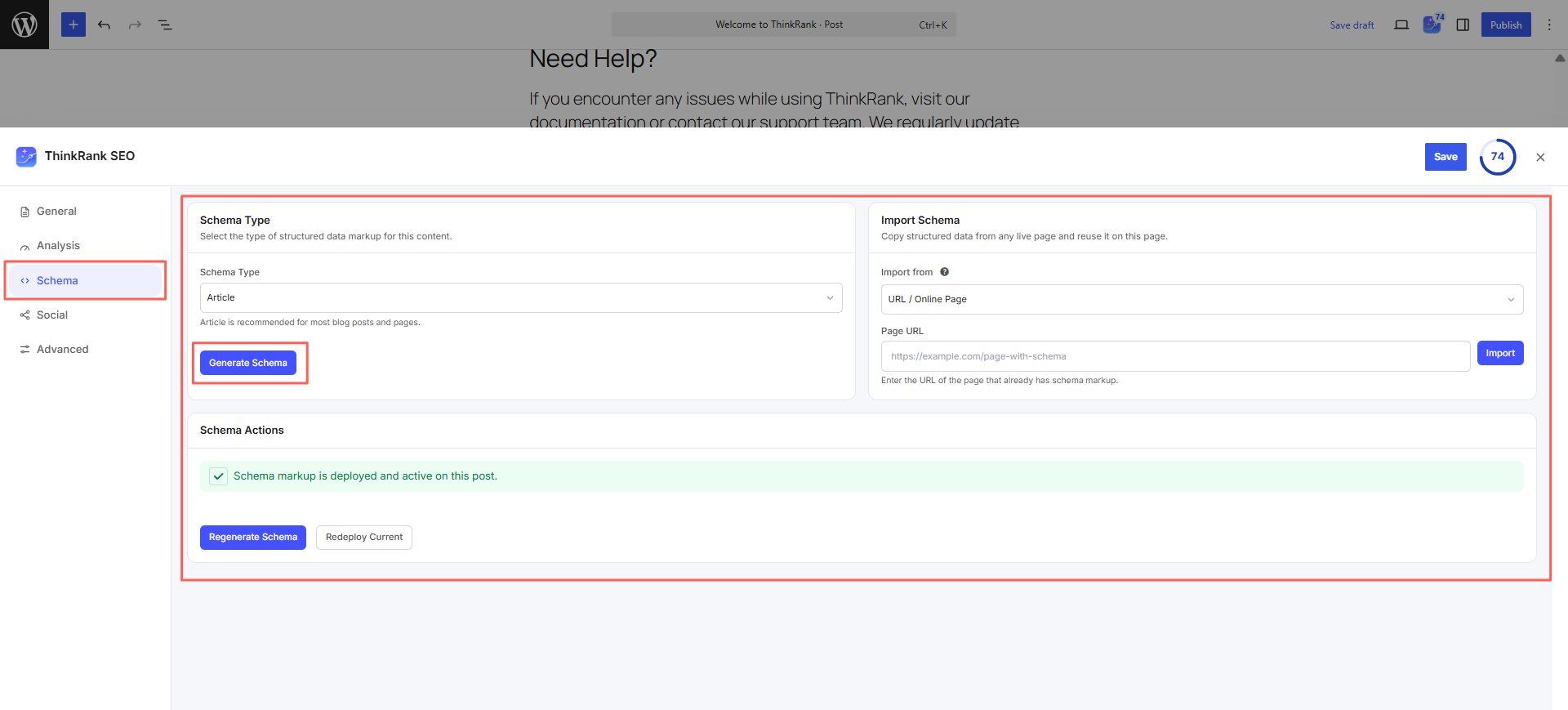
This is one of the more meaningful upgrades for Elementor users. Adding FAQ schema, Product schema, or Review schema manually usually means either writing JSON-LD by hand or relying on a separate plugin. ThinkRank generates schema through simple, one-click controls so that structured data lines up with what you have actually built on the page.
Note: Keep only one FAQ schema enabled (ThinkRank or from Essential Addons Advanced Accordion) to avoid duplicate FAQPage markup.
Search Console And GA4 Insights, Without Leaving WordPress
ThinkRank connects to Google Search Console and GA4 so you can see keyword performance, indexing issues and traffic trends from inside your WordPress dashboard. For Elementor users who are used to jumping between four or five different tools just to get a performance snapshot, this alone removes a lot of friction.
Site SEO Analyzer: Audit a Site with No Google Connection
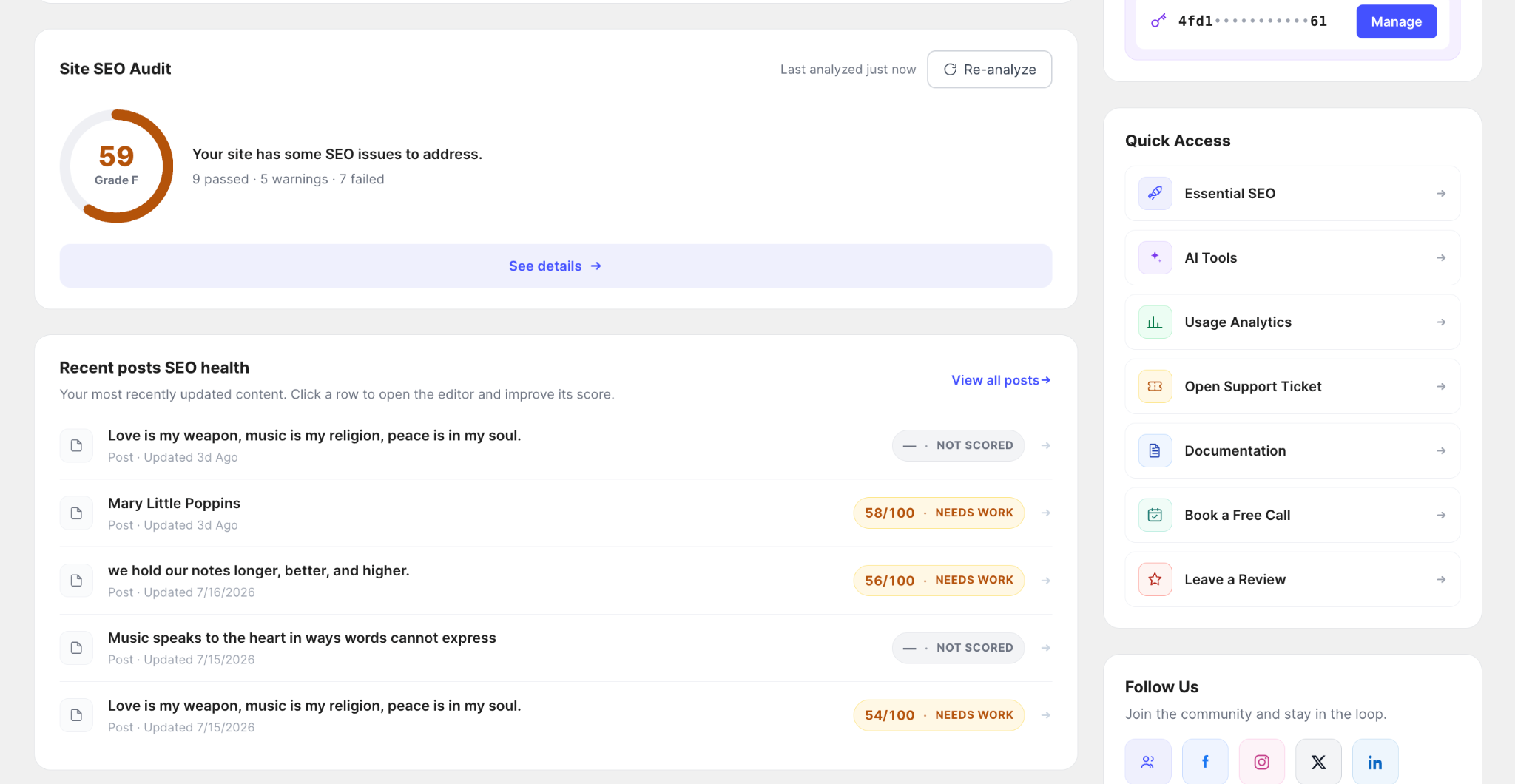
Not every Elementor site has a Search Console set up on day one; client sites, staging environments and freshly migrated builds often do not. ThinkRank’s Site SEO Analyzer can audit a site’s on-page SEO health without needing that connection at all, so you can still catch missing metadata, broken structure, or weak content before Search Console is even in the picture.
It covers Basic SEO, Advanced SEO, Content, Performance and technical, Security, and an AI Search (GEO) category that checks whether answer engines can read and cite you, including crawler access, a published llms.txt and FAQ or How-To schema. Pro adds audit history, run-to-run comparisons and daily or weekly scheduled audits.
Setting Up ThinkRank on Your Elementor Site: A Practical Walkthrough
Getting ThinkRank running alongside your existing Elementor setup is straightforward. Here is how you can install and activate ThinkRank on your WordPress website:
- Install and activate ThinkRank from your WordPress plugin dashboard, the same way you would install Essential Addons.
- Connect your Google account to pull in Search Console and GA4 data. This step alone gives you visibility you may not have had before, especially on older Elementor sites that were never properly connected to Search Console.
- Open an existing Elementor page and run your first content check-up. You’ll likely see a handful of quick wins immediately: a missing meta description here, a thin FAQ section there.
- Generate schema for pages that need it. Start with anything that has an FAQ, review, or product listing, since those get the most visible benefit from structured data.
- Enable llms.txt under ThinkRank’s Crawling settings from Essential SEO choose which content types to include. For most Elementor sites, prioritizing your core service pages, pillar blog posts, and documentation is a sensible starting point.
- Migration support: ThinkRank includes a migration feature that pulls in existing meta titles, descriptions, and redirects from the previously used third-party caching plugins, so switching does not mean rebuilding your site’s SEO settings from scratch. You can import your existing SEO data, then spot-check your top pages before switching off the old plugin in just a few clicks.
- Optionally connect the MCP server if you use Claude, ChatGPT, or Cursor regularly, so you can hand off routine SEO tasks in plain language instead of clicking through menus.
You can also check the detailed documentation to learn the step-by-step process of how ThinkRank works.
A Worked Example: Optimizing an Elementor Service Page with ThinkRank
Let us walk through a concrete scenario. Say you run a local plumbing business and built your “Emergency Plumbing Services” page in Elementor using a hero section, a services grid, a testimonials carousel, and an FAQ accordion at the bottom- a pretty standard structure for this kind of page.
Before ThinkRank, that page might have:
- A generic auto-generated title like “Emergency Plumbing Services – Untitled Page“
- No meta description, so Google pulls a random sentence from the middle of the page
- An FAQ section with genuinely useful answers, but no schema behind it
- No LocalBusiness schema, so search engines can’t confirm the business name, service area, phone number or opening hours.
After running it through ThinkRank:
- The meta title becomes something like “24/7 Emergency Plumbing Services in [City] | [Brand],” generated from the actual page content and matched to a realistic search intent
- The meta description is written to include the service area and urgency angle, rather than being left to chance
- The page is flagged as a priority entry in the site’s llms.txt file, since it’s a core service page
- The FAQ schema applied through ThinkRank, so it becomes eligible for rich results in Google and easier for an AI system to extract cleanly when someone asks ‘what should I do about a burst pipe at 2am
- LocalBusiness schema is added and matched against the business’s Google Business Profile, which is the pairing that actually drives ‘near me’ visibility.
None of these changes touch the page’s design. The Elementor layout stays exactly as it was built; the improvements happen entirely at the SEO and AI-readability layer, which is the point.
Start Making Your Elementor Site Visible to Both Search Engines And AI
Elementor will keep making it easy to build pages that look great. But looking great has never been the same thing as ranking well, and now it’s not the same thing as being AI-visible either. If your site has grown over the years without a consistent SEO layer behind it — or if you’ve never specifically prepared it for AI crawlers, that is a gap worth closing before it costs you traffic you don’t even realize you’re missing.
ThinkRank gives Elementor users a way to close that gap without leaving the builder they already know: AI-written metadata, one-click schema, a real llms.txt setup, and a built-in MCP server that lets you manage SEO conversationally. If you are curious what your current setup is missing, running a content check-up on even one or two of your key pages is usually enough to see where the gaps are. Want to learn more about ThinkRank? Book a call with the ThinkRank team to get a detailed walkthrough.
Was this blog helpful? Share your thoughts with us in our Facebook Community. Do not forget to subscribe to our blog for the latest updates.