
In 2025, the Elementor addon strategy was simple. Stack more addons. Get more widgets. Build more features. The trade-off in performance was real, but tolerable.
In 2026, that strategy is becoming harder to justify. Three forces converged this year that changed the math entirely. Elementor 4.0 launched with a single-DIV wrapper architecture that reduces DOM (Document Object Model) output by up to 40%, but only if your addons keep up with it.
Mobile Core Web Vitals tightened. Plus, AI content in Google search has grown from 2.27% in 2019 to 17.31% in 2025, which means slow Elementor sites get penalized twice (once in traditional rankings and once in AI Overviews).
These shifts changed what “optimized” actually means. The new standard rests on three pillars. Minimal: one core toolkit, not five stacked addons. Fast: loads only what each page needs. Scalable: handles agency workloads and complex builds without breaking.
This guide defines what an optimized Elementor toolkit looks like in 2026, the measurable criteria that matter, and how to migrate without breaking production sites.
Quick Summary / TL;DR
Here is the strategic summary in 60 seconds.
- Elementor 4.0 launched in April 2026 with a single-DIV wrapper architecture that reduces DOM output by up to 40 percent
- 71% of WordPress developers report performance issues caused by heavy addon stacks
- Three pillars define an optimized Elementor toolkit in 2026: Minimal, Fast, Scalable
- Stacking 4 to 5 small “lightweight” addons is now slower than running one well-built comprehensive toolkit
- Per-widget asset loading is table stakes, not a premium feature
- The agency economics favor consolidation: fewer plugins to maintain, fewer security risks, fewer compatibility issues
- Performance now affects AI search visibility, not just traditional rankings
Why 2026 Changed the Elementor Toolkit Game
The Elementor ecosystem in 2026 looks different from 2025 in three measurable ways. Each shift has direct consequences for how addons should be evaluated and chosen.
1. Elementor 4.0 And The Single-DIV Wrapper Architecture
In April 2026, Elementor 4.0 shipped a fundamental architectural change. The new single-DIV wrapper system reduces DOM output by up to 40 percent compared to the previous nested-DIV structure. This is the biggest performance change Elementor has shipped in years.
The implication for addon choice is important. Addons built for the old nested-DIV architecture do not automatically benefit. Some still output the old structure even on Elementor 4.0 sites. The addons that were updated within days of the 4.0 release are better positioned to take advantage of the new architecture. The ones that did not lag behind.
2. Core Web Vitals Tightened on Mobile
Google tightened the Core Web Vitals thresholds for mobile in 2026. According to Google’s official Core Web Vitals guidance, the LCP, INP, and CLS target all factors into ranking decisions and rich result eligibility. Both LCP and INP are sensitive to JavaScript output, which is exactly what bloated addon stacks produce. For sites running 4 to 5 Elementor addons, the combined payload now consistently fails the new mobile thresholds. The same site running one consolidated toolkit often performs better than a site running several overlapping addon plugins.
3. AI Search Visibility Now Rewards Performance
In 2026, AI search experiences (Google AI Overviews, AI Mode, ChatGPT browsing) all factor page performance into source selection. Slow pages get cited less, regardless of content quality. Page speed is no longer just a ranking factor. It is now a discoverability factor across every major AI search experience, which means Elementor sites running bloated addon stacks lose visibility in both traditional and AI search at the same time.
4. The “Stack of Addons” Strategy Ages Out
For years, the conventional wisdom was to use multiple small, specialized addons rather than one large one. The thinking was that smaller addons were lighter. In 2026, this is no longer true. The WordPress.org performance team’s research confirms that combined plugin overhead, not raw plugin size, drives most performance issues.
For example, five small addons with 5 separate asset pipelines, 5 separate CSS files, and 5 separate JavaScript bundles consistently underperform one comprehensive toolkit with selective widget loading.
What Does Optimization Actually Mean in 2026? (The Three Pillars)
The word “optimized” gets thrown around in every Elementor addon listicle. Most never define it. Here is a precise definition with measurable criteria.
Pillar 1: Minimal
An optimized Elementor toolkit is minimal in its impact on your WordPress stack. That means one core toolkit instead of four or five stacked addons. Fewer plugins to maintain, fewer security update cycles to track, fewer plugin conflicts to debug. The fewer plugins your site runs, the smaller your attack surface and the faster your administrative workflow. These compounds across multi-site agencies and growing stores.
Pillar 2: Fast
An optimized toolkit only loads what each page actually needs. This is called per-widget asset loading, and it is the most important technical capability in 2026. Without it, the toolkit loads CSS and JavaScript for every widget on every page, regardless of whether the page uses them.
Selective widget enabling and disabling is the related capability. You turn off widgets you do not use, and the toolkit stops loading their assets entirely. According to Spexo Addons performance research, addons with per-widget asset loading consistently score 20 to 30 points higher on Lighthouse mobile tests than addons without it.
Pillar 3: Scalable
An optimized toolkit handles real workloads. Agency multi-site setups. Comprehensive WooCommerce stores. Membership sites. The toolkit covers enough surface area that teams do not outgrow it and start stacking additional plugins. This is where consolidated toolkits beat small, specialized addons.
A toolkit covering 100+ widgets means users are getting everything, including features, maintenance and more, they need for an optimized Elementor website.
| Pillar | What Good Looks Like | What to Avoid |
| Minimal | One core toolkit replacing 3 to 5 specialized addons | Stacking 5 small addons “for performance” |
| Fast | Per-widget asset loading, selective enable/disable, clean modular code | Loading all CSS/JS on every page, even unused widgets |
| Scalable | 100+ widgets, agency multi-site support, active updates | Comprehensive but slow-to-update toolkits |
The Numbers Behind the Shift
The data on Elementor addon performance in 2026 tells a clear story.
1. Performance Research From the Field
Agency research compiled by DebuggersStudio found that 71% of WordPress developers and SEO specialists identify performance issues caused by heavy sliders, excessive DOM output, and stacking multiple Elementor addon packs. This is the single most important data point in the 2026 Elementor conversation. The cause of performance issues is not Elementor itself. It is the addon stack.
2. Why Agencies are Consolidating Their Stacks
The same DebuggersStudio agency research found that 69% of experienced Elementor users now warn against excessive flexibility without structure. The agencies that managed large Elementor projects more efficiently in 2026 reduced their average addon count from 4 to 5 down to 1 to 2. A single comprehensive toolkit creates a stable foundation. Multiple specialized addons create maintenance overhead that compounds across every site in the agency portfolio.
3. What 2 Million+ Installations Mean for Stability
Toolkit stability matters more in 2026 than it did in 2025 because Elementor 4.0 broke compatibility with addons that had not been updated. The toolkits with large, active user bases got the fix shipped within days of the 4.0 release. The ones with smaller user bases took weeks in some cases. An active development cadence is now a real evaluation criterion.
What an Optimized Elementor Toolkit Looks Like in Practice
The three pillars become concrete when you look at what an optimized Elementor toolkit actually contains. Here are a few core widget sets. These four categories cover roughly 80 percent of what most Elementor sites need.
- Content widgets (advanced headings, post grids, search bars, accordion blocks).
- Design widgets (image hotspots, image masks, interactive cards).
- Marketing widgets (pricing tables, testimonials, countdown timers).
- Form widgets (custom form styling and conditional logic).
1. The Extensions That Compound Value
Extensions in this context are not separate widgets. Unlike widgets, extensions modify how existing Elementor elements behave instead of creating new design elements. Hover effects, animations, conditional display rules, and custom cursors all fall into this category. A toolkit with strong extensions multiplies the value of every base widget. Without them, you end up installing additional plugins for visual polish, which defeats the consolidation goal.
2. WooCommerce Coverage That Does Not Require Separate Plugins
For Elementor sites running WooCommerce, the toolkit needs to cover product display, cart, checkout, thank you page, and account dashboard widgets. Without that coverage, store owners stack a separate WooCommerce customization plugin on top, which reintroduces the bloat problem the toolkit was supposed to solve.
3. Advanced Design Tools
In 2026, design tools without advanced features are a must. The Figma to Elementor Converter is now a standard part of a complete toolkit. They remove the design-to-build translation step that used to consume hours per project.
4. Premium Support And Active Development Cadence
The toolkit you choose must keep up with Elementor’s release cycle. Active development is no longer a nice-to-have. It is the difference between a toolkit that works on Elementor 4.0 and one that quietly breaks features.
Now that we have defined what an optimized Elementor toolkit should look like, let us evaluate how a real-world Elementor toolkit compares against those criteria. For this blog, we will discuss Essential Addons, the first and most popular Elementor Addon in the WordPress repository.
How Essential Addons for Elementor Align with This 2026 Standard
Essential Addons for Elementor already includes many of the capabilities that became increasingly important in 2026. Here is how it maps to each of the three pillars.
1. 110+ Widgets And Extensions in One Toolkit (Minimal)
Essential Addons covers every category an Elementor site needs in a single architecture. Content Widgets, Design Widgets, Marketing Widgets, Form Widgets, Dynamic Content, WooCommerce Widgets and Creative extensions.
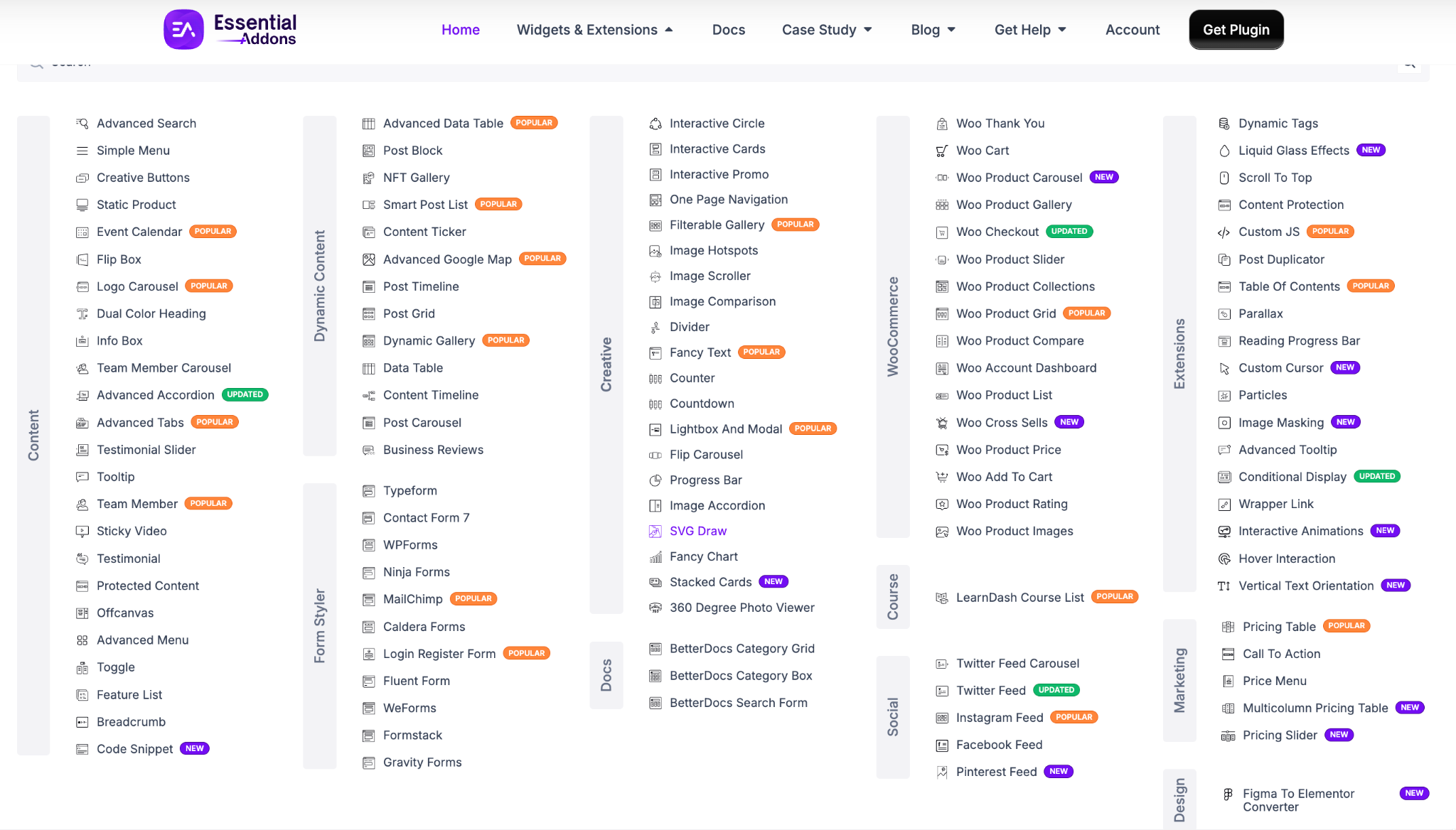
The full widgets and extensions demo library shows the complete coverage in one place. For most Elementor projects, Essential Addons can replace several specialized addons depending on the workflow. That is the Minimal pillar in practice.
2. Per-widget Asset Loading And Selective Enable/Disable (Fast)
Essential Addons ships with per-widget asset loading by default. In simple terms, only the CSS and JavaScript required for the widgets on the current page are loaded instead of loading assets for every widget available in the plugin. Each widget loads its own CSS and JavaScript only when used on a page.

Combined with the widget enable/disable controls in the WordPress admin, you can run only the widgets your site uses and skip the rest entirely. This modular system allows you to disable widgets you never use, reducing unnecessary assets and making the editor easier to manage.
3. WooCommerce Widgets, Figma to Elementor Converter (Scalable)
The scalability pillar is where the comprehensive coverage shows its value. Essential Addons includes 16 dedicated WooCommerce widgets covering product display, cart, checkout, thank you page, and account dashboard.
On the other hand, the Figma to Elementor Converter handles design-to-build automation. You can directly turn your Figma design into a fully scalable Elementor website with just a simple copy and paste.
4. 2 Million+ Users Mean Stability And Active Development
A large active user base often goes hand in hand with frequent updates, ongoing compatibility improvements and a mature support ecosystem. Essential Addons is one of the most-used Elementor addons in the WordPress ecosystem, with 2 million+ users. That scale funds the active development cadence. When Elementor 4.0 launched in April 2026, Essential Addons was compatible within days, not weeks.
For example, SK – America, one of our users, made their development work 3X faster using Essential Addons for Elementor with its minimal, fast and scalable features.

👉 Read the full case study: SK-America’s Growth Story to Becoming a Web Design Powerhouse
How to Migrate to An Optimized Toolkit without Breaking Your Sites
For teams running 3 to 5 Elementor addons today, the migration to a consolidated toolkit needs to be deliberate. Done well, it is one of the highest-leverage technical projects of the year. Done badly, it breaks production sites.
1. Audit Your Current Plugin Stack
Start with a complete inventory. List every active Elementor addon, what widgets you actually use from each, and what each one costs annually. The audit usually reveals overlap (multiple addons covering the same widget categories) and dead weight (addons installed for one widget that is rarely used). Take a full backup or staging snapshot before replacing production plugins.
2. Map Features to The New Toolkit
For each widget category you actually use, identify the equivalent in the new toolkit. The comprehensive documentation for Essential Addons makes this mapping straightforward. Most categories map directly. The few that do not map directly are either available through extensions or no longer needed.
3. Replace One Site At a Time & Monitor Performance
Never migrate the full portfolio at once. Pick a low-stakes site first. Install the new toolkit. Disable the old addons. Verify every page renders correctly. Run Core Web Vitals tests before and after. The performance lift typically shows up immediately. Sites that scored 60 on mobile Lighthouse often jump to 80 plus after consolidation. That data builds the case for migrating the rest of the portfolio.
4. What Metrics to Track During Migration
- Lighthouse mobile score before and after
- Total CSS and JavaScript payload per page
- Time to Interactive on critical pages
- Number of active plugins on the site
- Visual regression checks on key page templates
Optimize Elementor Website with The Best Toolkit in 2026
The 2026 Elementor ecosystem rewards a different kind of toolkit than 2025 did. Minimal beats stacked. Fast beats feature-heavy. Scalable beats are narrowly specialized.
Three takeaways are worth holding on to. First, the “stack 5 small lightweight addons” strategy is over because the combined overhead exceeds one well-built toolkit. Second, per-widget asset loading and selective enable/disable are now non-negotiable. Third, Elementor 4.0 changed the technical baseline.
If you are ready to consolidate your Elementor stack and run a toolkit built for the 2026 standard, explore Essential Addons and see whether it matches the optimization criteria discussed in this guide.
Frequently Asked Questions (FAQs)
What is an optimized Elementor toolkit?
An optimized Elementor toolkit meets three criteria. It is minimal (one core toolkit instead of multiple stacked addons), fast (per-widget asset loading and selective enable/disable), and scalable (comprehensive coverage so teams do not outgrow it).
How many Elementor addons should I have?
For most Elementor sites, one comprehensive addon is the optimal count. Two at most. The “stack 4 to 5 small addons” approach is outdated in 2026 because the combined performance overhead exceeds what a single well-built toolkit produces.
Does Essential Addons slow down a site?
No, when configured correctly. Essential Addons ships with per-widget asset loading and selective enable/disable. Each widget only loads CSS and JavaScript on pages where it is used. Disabled widgets do not load anything at all.
Is Elementor 4.0 compatible with Essential Addons?
Yes. Essential Addons updated for Elementor 4.0 compatibility within days of the April 2026 release. The toolkit takes full advantage of the new single-DIV wrapper architecture and the up to 40 percent DOM reduction it provides.
What is the best lightweight Elementor addon?
The framing of “lightweight” is misleading in 2026. The better question is “what is the most optimized addon,” which combines lightweight loading with comprehensive coverage. And tools with 2 million+ users might be considered an optimized Elementor kit, right?
How do I migrate from multiple addons to one toolkit?
Audit your current stack. Map the widgets you actually use to the new toolkit. Migrate one low-stakes site first. Verify all pages render correctly. Monitor Core Web Vitals before and after.
Does plugin bloat affect AI search visibility?
Yes. AI search experiences in 2026 factor page performance into source selection. Slow pages get cited less. Bloated addon stacks that hurt Core Web Vitals now hurt AI search visibility too, not just traditional rankings.